Showing posts with label bloging. Show all posts

Sunday, 7 July 2013

WordPress Backup Guide – How to WordPress Backup

0
WordPress backup is very important because there is tone of issues that can destroy your blog because of some little mistakes even some usually using plugins can damage blog scripts once damaged a normal user are unable to fix it then blogger have to pay money to some master for fixing errors. So you should build your backup automatically every minutes once your blog got damage you can restore it immediately. This was the brief importance why wordpress backup is important.
How to do WordPress Backup with complete MysqlDatabase & Filemanager best ways
It is not compulsory only do wordpress backup even if you are on BlogSpot blog then you also should keep backup or if you are on website then keep backup.
There is many ways to do wordpress backup but I will explains some important and working methods of wordpress backups.

WordPress Backup Guides

Here is:
  1. How to do WordPress backup with phpmyadmin & Filemanager from Cpanel
  2. How to do WordPress backup from Cpanel
  3. How to do WordPress Backup with WordPress backup Plugin (Automate WordPress backup to Dropbox)
So let’s Start Tutorial

1. How to do wordpress backup from Cpanel with phpmyadmin & filemanager  a complete Guide.

Step 1 >> go to your Cpanel login if you don’t know get it from your host provider and login to cpanel onec you login roll down the page and seek for phpmyadmin tab once you found press it may be you have to login with your Mysql Database details or maybe it will login automatically.

Step 2 >> Open Phpmyadmin and choose your sql database and select all tables and click on export button
Step 3 >> Once you goes for exporting database it will ask to choose compression method leave anything just press Go buttons.

You are done Mysql database file will began download.
Now Another Step Backup filemanager go to filemanager and select all files and compress it you can download it quickly or login using ftp client you can download all files for more instructions watch our video Tutorial.

2. How to do WordPress backup from Cpanel Official Cpanel Backup Feature

This is official website backup feature from cpanel you can use it to backup your wordpress blog complete and also can restore.
Step 1 >> Go to Cpanel and Find for Backup Wizard and press the tab.

Step 2 >> Press Backup Button
Step 3 >> Press Full Backup button and Continue if you want to backup only mysql database you can do also by selecting from right side of the options page.

Step 4 >>

3. How to do WordPress Backup with Dropbox (Automate WordPress Backup)

It is best way to do backup wordpress it will automate do backup for your wordpress you can schedule it to when ever you want to do daily, weekly, monthly, yearly or what any time. It will store files to your dropbox account.
So getting start Guide:
Step 1 >> You need a dropbox account if you have not you can signup here.
Step 2 >> Go to wordpress blog and Install new wordpress plugin click here to download plugin.
Learn: How to Install WordPress Plugin
Step 3 >> Once you installed plugin got to WordPress backup plugin settings and authorized your wordpress with your dropbox account once you linked please continue it.

Step 4 >> Now click on backup log or backup section and do backup and make schedule.

Here is Backup Log

Wednesday, 26 June 2013

How to Make Solid Backlinks For Your Blog / Website

0

Make Solid Backlinks.

In this Guide You will learn. How to Make Solid Backlinks for your Blog or Website. Create Save backlinks and build it successfully for your Blog.
Whenever you start SEO of your blog, the first thing which comes into your mind is “Link Building”. Link building is the technique or you can say a method which tell Search Engines about the popularity of your blog and it also tells that there is a blog.
When we start link building it is hard to differentiate between black hat and white hat link building techniques, but due to latest panda and penguin updates you have to use only white hat techniques for your blog’s link building.
Today I am going to present some Solid SEO link building strategies which i am using, so let’s get started:

1. Blog Commenting:

The worst and also the best type of link building is blog commenting, it involves a method using which you go to some blogs or websites, read the content and comment about that content. You have to include a back link pointing towards your blog. Often this is done by leaving your blog’s link in “website” section in comment form.
Some people try to do a very irritating comment just for gaining a link, which can be seen easily through their comment and ultimately which is trashed by blog owner. To get your comment approved you need to do a relevant comment which really impresses the owner and tell him that you have read his content.
And please do not try to spread spam  through some of the software, which is a black hat trick and can lead your blog to a penalty by Google. Try to Make Solid Backlinks Only.
Read : Google Dofollow Penalty Coming and How to Avoid it.

2. Directory submissions:

Directories are websites to tell users that what your site is about. There are a lot of Directories out there which are called Spam directories, Please do not try to submit your blog or website there it can cause a penalty to your blog.
Always try to submit your website to top ranking and trusted directories like Yahoo and Dmoz, you have to pay some bucks but that cost will worth it. Try to find some high quality free directories and submit your website there.

3. Social media:

These days, Link building have crossed its limits and entered social media networks. Some of the social media networks claim that they are giving do follow back links to worthy content, and worthy content is defined as most shared content on social media.
You should try to use this opportunity to create some quality back links. Try to sign up for some of the top social media sites such as Facebook, Google Plus, Pinterest, Twitter, etc. These site can give your site more back links as well as exposure to people.

4. Guest Blogging:

This is probably the best type of link building strategy, Links obtained by guest blogging are more worthy. You have to develop a list of top blogs with high authorities and try to submit guest posts there.Try to set your goal, for me it was 50 guest posts in a month.
Try to do your best in guest post and never ever try to spin content. I had received many guest post requests but when i saw their articles, they were spinned badly. It leaves a bad impression on blog owner and also you can lose your trust forever which is not good thing.
A good guest post can provide your blog with a lifetime quality back link which will be good for your site’s rankings.

5. Link Exchange:

Last but not the least, Link exchange can be very effective in link building campaigns for your website. We are listing that google is penalizing link exchange websites, but try to do some research and find out some high authority blogs or websites related to your website and ask him to exchange link with your blog or website.
This can lead to high quality backlink. You can also exchange links with your friend’s websites and more than that they would be trustworthy. These were some methods of link building according to seo rules defined by Google, try some of these and also share your experiences with us in comments.

Google Dofollow Penalty Coming and How to Avoid it

0
Beware all the bloggers out there! Google Do Follow penalty is coming and it will hit your blog soon. If you are a blogger and accepting guest posts/sponsored posts/paid posts just for generating an increase in income then you have to stop all such kind of work. As Google’s Do Follow penalty will hit only those blogs that are involved in selling links/accepting guest posts/sponsored posts and even those bloggers who are allowing other bloggers to write an article for them and in return they will get a link. Such bloggers are on the hit list and there are many chances that these blogs will soon be hit by the penalty in the coming days. According to our research, Google has been examining various blogs and there are many blogs who face a serious decline in traffic and there might be some chances that these websites are involved in Do Follow linking.
If you are a blogger and want to save your blog from such penalty then you have to follow some of our advices.

If you are running a Do-Follow blog:

If you are a blog owner, and publishing many do-follow articles. What is Do-Follow? In simple words, “You scratch my back and I scratch yours”. Or we can say, you put my links in your blog and I will do the same for you. Both the parties will get a link back in return. This is called Do-Follow linking and it’s done just to increase the site’s reputation. But now Google is putting penalty on such websites that are involved in it. This is the main reason, why we advise you to stay away from do-follow linking.

If you are accepting sponsored/paid or guest posts:

If you have a blog and you are accepting guest posts, paid posts, or sponsored posts then it’s best to avoid them now. All these posts or articles have a backlink and Google is taking some serious measures to end this issue once and for all. So, we advise to stop posting too much guest/paid posts.

If you’re involved in comment linking:

Many bloggers add their links, when commenting on another blog. We have also seen many blog that allow other bloggers/blogs to add comment and get a back link. This is really an old technique and a lame one. e.g.: “I love your blog and you should check my blog too (This is blah blah link)”. Many blogs who are involved in this technique they should stop it as fast as possible.
Finally, we just want to tell you if you are a new blogger or a professional one, you should make back links by writing something unique and reader friendly. Spamming and Do-following is over, now it’s time to do it the hard way. So be prepared for it.

How to decide best Niche for your blog

0
Starting a blog is not as easy as it looks. It’s not about what theme you add, what colors it have or what kind of ads are on your blog. It is primarily about what niche you have decided to start a blog on. Now the question is how to decide which niche is best for you. Well there are few important aspects to keep in mind when you are deciding a niche for your blog. But before that, you have to ask yourself that why you are starting a blog. Is it just for fun, to pass your free time or you are planning to make money from it. This will help in deciding the right path for you to walk on and select the best niche for you. So following are few of the important methods to look upon when you are going to establish a blog.


What you are interested in:

 Before selecting a particular niche for your blog, ask yourself, what do you like? In which area you think you have more command and can come up with great content. What you love to write on. If you could sort that out, than it will be just a few clicks away that you will be able to establish a blog for the niche that interests you the most. Than writing content and selecting topic for your every blog post will be a piece of cake for you.

Get a popular topic:

 Ok let’s assume that you don’t have anything in your mind on which you would love to write. But still you are willing to get yourself a blog. So search for the topic that is hot these days. Search for other blogs, look what they are writing about on the hot topic and then start blogging on that niche. But you must keep this in mind that the topic you have selected should be growing in terms of being popular. Selecting such a niche that is not making good ranks anymore and is moving downwards can cause trouble to you in future.

Can you get enough content:


Last but not the least, you should also search well before establishing a blog on a particular niche that will you get enough content on it. If you have selected a blog that is popular currently but you can’t get much content on it so there will be no difference between your blog and other blogs who are working on that same very niche. So in order to get your blog with high rankings, you need to get ample amount of content over it so that your blog could be very informative for your visitors.
So above are few of the important tips to keep in mind before having done with your blog. These tips will help you to get the best niche for your blog so that you could get good amount of daily visitors on your blog and make your name in the blogging world.

Saturday, 22 June 2013

Using Social Networking Websites To Boost Traffic

0
Social Networking website's always play's important factor towards increasing website traffic.Many website giant use it as magic wand which increase's there traffic.But to become successful you have to work hard till you start getting result's.You could use social networking website's as an advertising agent.Tons of user's daily visit social networking website to interact with there friend during the interaction they lead towards your website.Most of Social Networking website's like Facebook,Twitter,Flickr and etc are used commonly to increase popularity of website.The latest addition in social networking website is Google Plus.It is beating almost every social networking website,this is the reason why publisher is now using Google plus instead of Facebook,twitter and etc.Today's Topic is To Drive Traffic From Social Networking Websites

1.Increasing Traffic Through Facebook:
Facebook has great importance on the internet so now days its becoming compulsory for every publisher to build there own Facebook page related to there website niche.But your major work is not done after you create your Facebook page.You must have sufficient likes to build traffic for your website.You can ask your friends,family to like your page but it will not give you desirable results.To increase your Facebook Page like you have to work hard and when your likes are increased just enjoy the true fruits of traffic.Your website must contain a facebook share widget.If you want to spread your content this will boost your traffic a lot

2.Building Twitter Follower's To Build Traffic:
Twitter always remained in Headlines from very start,so you must have a twitter account but more importantly you must have good amount of followers on twitter in order to drive traffic from it.You must insert a tweet Now widget in your website to link your content on twitter this will not only increase your backlinks but also work as a traffic machine.

3.Using Google Plus To Boost Traffic:
Google plus has great importance in social networking website.It's even more important and useful then Facebook.The Google + feature makes it more useful for a publisher.But you must have peoples in your circle to make it working.When ever any one in your Google plus contact will share or Plus 1 any url/content it will automatically ranked well in your Google search if you are logged in your Google plus account.But when you are not logged in your Google Plus one account this will not work and the search results will be totally different

4.The Remaining Important Social Networking Websites:
LinkedIn:Your Website must have LinkedIn Share button to increase traffic
MySpace:Help you to build backlinks and traffic
Flickr:Help you to To build your website community and to build backlinks
From The Editor's Desk:
So i hope you have enjoyed a treat of tips to increase your website traffic via social networking websites.If you spend 2 to 3 hours a week on social networking websites,I am certain it will help you to boost your traffic.More importantly you should not spam,follow all the rules and regulations of social networking websites if you fail to do so you might face detention in form of banning

5 Basic Tips To Start Your Blogging Journey In Blogger As Beginner

0
http://techigyaan.com/wp-content/uploads/2013/05/HOW-TO-START-BLOGGING-TIPS-TECHIGYAAN.jpgBlogger is the most easy and most fascinated platform for publishers to start the blogging journey.Blogger was founded to gave publisher reliably and solidity.Blogger is the most used platform in the world the reason why it is ranked 45 in the whole world and in most of counties it is on top 10.

Most of popular publisher recommend blogger instead of WordPress due to is solidity.There are many chats comparing wordpress and blogger but in the end blogger is the one who should win because of its user friendly experience.Blogger has helped the publisher to work freely with out any limitations.Another good thing about Blogger is that it could be optimized very easily,if you want to change styles it can be done in few steps,adding different widgets,working with Html CSS and much more has become much easier.Another  key feature of blogger it is free you don't need to spend a single penny in buying hosting you just need to spend few dollar's in buying a domain for yourself.So todays topic is not so much difficult nor it is so easy its just your pure concentration will gave you the fine idea how you could start your journey in blogger 

1.To Start A Blog According To Your Abilities:
You must start a blog in which you can work like a true patron and lead your audience to desirable content.You should not think about your self but you must Think about your audience that is trusting you.So in the first step you must start a blog according to your capabilities.If you started a blog against your capabilities you will not go far but you would face lows of difficulties.So its better to chose correct niche for your blog 

2.How to start Posting At Blogger:
To start posting at blogger go to Your Blog >> New Post >> fill the Title and compose your post allocate your label and Publish your post.
What is LABELS:It works as categorise if you want your post to filled under same categorise then you should use the same LABELS.For example: I post Pc games so i will always use PC Game LABEL so that each time i post new games i would fill in PC GAMES.

3.Optimizing/Editing Your Posts In Blogger:
To edit you customize/change your post should go To Your Blog >> Posts >> Edit Posts >> do the changes you want And Press the Publish Button
4. Unpublicized your Post (To Revert Your post to Draft) In Blogger:
If you want to unpublic you post so its is not viewable by users and bots you have to follow the same processes go To Your Blog >> Posts >> Edit Posts >> And now Press REVERT TO DRAFT and now your post is unpublicized
5.To  Edit/Change Blogger Template:
To Edit Blogger Template:Go to Your Blog >> Template/Layout >> Edit HTML > Proceed.Now you can edit your template to get full template select Expend your Widget.
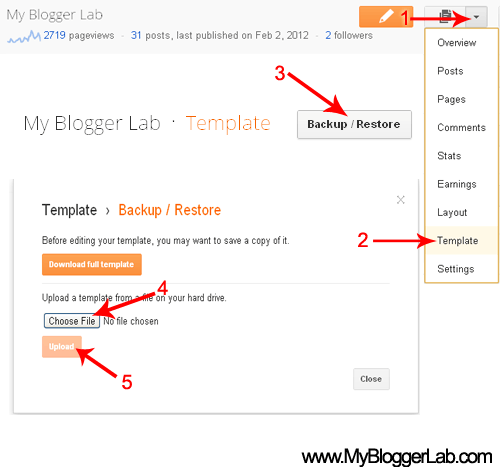
To Change Blogger Template:Go to New Blogger Interface >> Your Blog >> Template >> Backup/Restore >> Choose file >> and Upload your template.Important:blogger could only upload Xml blogger templates begginear

Saturday, 18 May 2013

How to bring traffic by facebook

0

Are you active on Facebook and yet you don’t seem to get many visitors coming from Facebook to your blog?

Let’s first define what we’re talking about:


Facebook is not the first social network but it is the most popular one. There are many other social networks before Facebook and while some of them were popular at some point in time, none could reach the popularity of Facebook. In addition to keeping in touch with your friends, Facebook can be (and is) used for business. You can use it to promote your products and services, to acquire new clients, or to get traffic to your site.


You probably have a personal profile page on Facebook.  This is the type of Facebook page that must be about a person and NOT about a business.  You have your own name and your own photo on the page.  And people can “friend” you.
Now do you have a (business) page for your company or blog?

1 :  Ask your Friends to Visit your Website

Every one use facebook for chating with peoples.For this purpose you have to make lot of friends on facebook.When you are log in to your facebook account and chating with your friends then ask your friend to visit your site and share it with their friends

2: Get traffic through Facebook Pages

You might create a facebook fan page about your product and share your website daily on it.
If you don'nt want to create your own facebook page then you have to create a list of popluar facebook pages and after it share your site daily on pages

3: Get Traffic through Facebook Groups

There are so many groups on facebook containg millions of peoples.You might to be join lots of biggest groups when you have joined lots of facebook groups you should share your content on groups atleast 3 to 4 times in a single day.

Hope this article will help you to bring lots of traffic to your site
Thanks for comming here

You Might Read New Facebook Comment Box for Blogger


Saturday, 11 May 2013

New Facebook Comment Box for Blogger With Notifications Enabled

15
Facebook comment box for your blog can serve as a good way to make your site more engaging and encourage readers to drop comments if they’re already logged in to Facebook.It will bring more trafic to you blog or website for example when i'll comment on any website through facebook comment box that page will automatically share on my wall but it has a disadvantage it has no SEO value since it's displayed in iframe which google dont like.The main advantage of  Facebook comment box is that it lack lot of traffic to your website

In 2009 facebook developers introduced thier best and famous plugin called "Facebook Comments Box".
Facebook Comments Box can be  embedded in any website and blog and visitors can use thier facebook ID's to leave comment,they can also use Yahoo, AOL or Hotmail to leave comment.
This is how the Facebook Comments box looks like,
                                                                    LIGHT SCHEME
DARK SCHEME

How to add Facebook comment box to Blogspot

There are some steps to get this done but chill out, it’s easy, ok? :D Just follow the steps and you’ll have a nice Facebook comment box installed on your blog in no time.

1. Creating a Facebook Application


  1. Go To Facebook Developers Page
  2. Submit your blog URL and give it a name. Keep Site name as your "Blog Title" and Site URL as your "blog address" 


     3.   Hit "create app" button and proceed
     4.   After submitting the security check code you will see this page,


       5.   Save that App ID in a notepad because we will need that latter. Now Click the link near the top-right corner of the same page that says "Developer Dashboard"


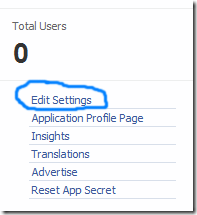
6.  One the new window that appears click the Edit Settings link ,
edit-settings
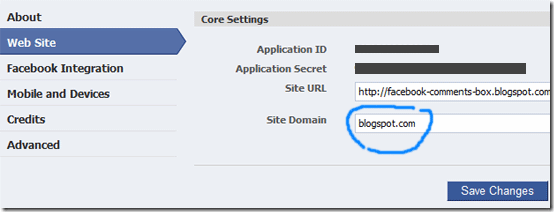
        7.  Then go to Website option and write your Site Domain as blogspot
website
       8.  Save Changes and jump to the next step of this tutorial

2. Adding the codes to your template

We’re adding simples sets of codes into your template to make this work the way we want, aight?

i. xmnls attribute
ii. SDK script
iiI. Open graph meta tag
iv. Comment form iframe code
Log in to your blogger account and click on Template > Edit HTML > Check Expand Widget Template
i. Press Ctrl + F and search for this code: <html
give a space and add below code
 xmlns:fb='http://www.facebook.com/2008/fbml'


5.  Next search for 
 <body>
Note: In New Blogger Designed templates the same code looks like this,
 <body expr:class='&quot;loading&quot; + data:blog.mobileClass'>
 
Find any one of these codes and just after it paste the code given below,
 
<div id='fb-root'/> 
    

<script> 


    window.fbAsyncInit = function() { 


    FB.init({ 


      appId  : &#39;YOUR_APP_ID&#39;, 


      status : true, // check login status 


        cookie : true, // enable cookies to allow the server to access the   session 


      xfbml  : true  // parse XFBML 


    }); 


  };

    (function() { 
    

    var e = document.createElement(&#39;script&#39;); 


      e.src = document.location.protocol +   &#39;//connect.facebook.net/en_US/all.js&#39;; 


    e.async = true; 


      document.getElementById(&#39;fb-root&#39;).appendChild(e); 


    }()); 


</script> 
 
Replace YOUR_APP_ID with your Facebook application ID
     
6.    Next search for  </head> and just above it paste the following code,
 
 <meta expr:content='data:blog.pageTitle' property='og:title'/> 
    

<meta expr:content='data:blog.url' property='og:url'/> 


<meta content='Inspirational Online' property='og:site_name'/> 


<meta content='BLOG-LOGO-IMAGE-LINK' property='og:image'/> 


<meta content='YOUR_APP_ID ' property='fb:app_id'/> 


<meta content='http://www.facebook.com/AdhaPeerFaQeer' property='fb:admins'/> 


<meta content='article' property='og:type'/> 
 
 Make these changes:

  • Replace INspirational Online with your blog title/Name.
  • Replace BLOG-LOGO-IMAGE-LINK with the image link of your logo. Your logo will look good if it is in gif format and having this size ->  40px by 40px . This logo will appear next to your post title on Facebook profiles of your visitors like this,
logo
  • Replace YOUR_APP_ID  with the your Facebook Application ID that you saved in notepad
  • Replace 
    http://www.facebook.com/AdhaPeerFaQeer with your Facebook user profile link 
     
     
     7.    Now Search for this,
    <b:includable id='comment-form' var='post'>
    
    
     8.    Just after it paste the code given below,
     
    <b:if cond='data:blog.pageType == &quot;item&quot;'> 
        
    
    <div style='padding:0px 0px 0px 0px; margin:0px 0px 0px 
    0px;'><script 
    src='http://connect.facebook.net/en_US/all.js#xfbml=1'/> 


    <div> <fb:comments  colorscheme='light' expr:href='data:post.url' expr:title='data:post.title' expr:xid='data:post.id' width='520'/></div> 


    <div style='color:#fff; background-color:#3B5998;border: solid 1px #ddd; font-size:10px; padding:3px; width:510px;'>Facebook
     Blogger Plugin: Bloggerized by <b><a alt='blogger templates' 
    href='http://www.inspirational-online.blogspot.com' style='text-decoration:underline; 
    color:#fff;' target='_blank' title='blogger 
    templates'>Inspirational Online</a></b> Enhanced by 
    <b><a alt='blogger widgets' 
    href='http://www.twitter/abbasizaibi' style='text-decoration:underline;
     color:#fff;' target='_blank' title='Blogger 
    Widgets'>Abbasi Zaibi</a></b></div></div> 
      </b:if>
    
    
    • If you want to use the dark scheme then simply replace light with dark
    • To change the Comments box size, change this value width='520'
    • To change the footer credits size, change this value width:510px
    • Keep a difference of 10 pixels between the box size and footer size. For example if you set box-size to width='600' then set footer-size to width:590px

          9. Save your template and Bingo you are Done! See your blogs to find a beautiful comment box waiting to be touched.:)


50 Highest Paying Google AdSense Keywords 2013

0
We see that there are so many peoples and students thats only come for bloging to fill thier pockets by google adsense. They Want to earn huge Payment but generally they fail and not be able to earn huge payment.Have you ever noticed that why google are paying you less?

On First hand you get to read many success stories based on Google AdSense payments and on other hand Google AdSense disappoints you by paying you pennies. There are just two factors behind  AdSense pay-outs, the big traffic and the highest paying Google AdSense keywords.

Don’t worry Here i tell you that how you can increase your AdSense Income. You have just need to focus on keywords that you use in your article. The Google AdSense revenue is also depend on your blog/website niche. 
There are many people who takes months even years to get their first AdSense cheque of $100. I am sure if you target your keywords by the keywords mentioned below, you will get first AdSense cheque in just a month. 
Check out the 50 highest paying Google AdSense keywords of 2013 given below.

Highest Paying Google AdSense Keywords of 2013


  • Insurance


  • Taxes
  • Loans
  • Donate
  • Hosting
  • Advertising
  • Attorney
  • Rehab
  • Classes
  • Transfer
  • Software
  • Investing
  • Recovery
  • Claim
  • Trading
  • Lawyer
  • Credit
  • Credit Card
  • Conference  Call
  • Degree
  • Gas
  • Electricity
  • Treatment
  • Bonds
  • Cell Phone Plans
  • Cord Blood
  • Weight Loss
  • Anti Virus Protection
  • Online Banking
  • Internet Broker
  • Register Domain
  • Money
  • Marketing
  • Pay-per-click
  • Laptop Computer
  • Spyware
  • Depression
  • Vioxx
  • Refinance
  • Pharmacy
  • Consolidation
  • Big label
  • Cards
  • Internet
  • Printer
  • Settlements
  • Annuity
  • e-loan
  • Web Host
  • Union
  • Hope you like this article and It helps you in increasing AdSense revenue

    © 2013 iPRESS. All rights resevered. Designed by Templateism