Showing posts with label Traffic Tips. Show all posts

Wednesday, 26 June 2013

How to Make Solid Backlinks For Your Blog / Website

0

Make Solid Backlinks.

In this Guide You will learn. How to Make Solid Backlinks for your Blog or Website. Create Save backlinks and build it successfully for your Blog.
Whenever you start SEO of your blog, the first thing which comes into your mind is “Link Building”. Link building is the technique or you can say a method which tell Search Engines about the popularity of your blog and it also tells that there is a blog.
When we start link building it is hard to differentiate between black hat and white hat link building techniques, but due to latest panda and penguin updates you have to use only white hat techniques for your blog’s link building.
Today I am going to present some Solid SEO link building strategies which i am using, so let’s get started:

1. Blog Commenting:

The worst and also the best type of link building is blog commenting, it involves a method using which you go to some blogs or websites, read the content and comment about that content. You have to include a back link pointing towards your blog. Often this is done by leaving your blog’s link in “website” section in comment form.
Some people try to do a very irritating comment just for gaining a link, which can be seen easily through their comment and ultimately which is trashed by blog owner. To get your comment approved you need to do a relevant comment which really impresses the owner and tell him that you have read his content.
And please do not try to spread spam  through some of the software, which is a black hat trick and can lead your blog to a penalty by Google. Try to Make Solid Backlinks Only.
Read : Google Dofollow Penalty Coming and How to Avoid it.

2. Directory submissions:

Directories are websites to tell users that what your site is about. There are a lot of Directories out there which are called Spam directories, Please do not try to submit your blog or website there it can cause a penalty to your blog.
Always try to submit your website to top ranking and trusted directories like Yahoo and Dmoz, you have to pay some bucks but that cost will worth it. Try to find some high quality free directories and submit your website there.

3. Social media:

These days, Link building have crossed its limits and entered social media networks. Some of the social media networks claim that they are giving do follow back links to worthy content, and worthy content is defined as most shared content on social media.
You should try to use this opportunity to create some quality back links. Try to sign up for some of the top social media sites such as Facebook, Google Plus, Pinterest, Twitter, etc. These site can give your site more back links as well as exposure to people.

4. Guest Blogging:

This is probably the best type of link building strategy, Links obtained by guest blogging are more worthy. You have to develop a list of top blogs with high authorities and try to submit guest posts there.Try to set your goal, for me it was 50 guest posts in a month.
Try to do your best in guest post and never ever try to spin content. I had received many guest post requests but when i saw their articles, they were spinned badly. It leaves a bad impression on blog owner and also you can lose your trust forever which is not good thing.
A good guest post can provide your blog with a lifetime quality back link which will be good for your site’s rankings.

5. Link Exchange:

Last but not the least, Link exchange can be very effective in link building campaigns for your website. We are listing that google is penalizing link exchange websites, but try to do some research and find out some high authority blogs or websites related to your website and ask him to exchange link with your blog or website.
This can lead to high quality backlink. You can also exchange links with your friend’s websites and more than that they would be trustworthy. These were some methods of link building according to seo rules defined by Google, try some of these and also share your experiences with us in comments.

Saturday, 18 May 2013

How to bring traffic by facebook

0

Are you active on Facebook and yet you don’t seem to get many visitors coming from Facebook to your blog?

Let’s first define what we’re talking about:


Facebook is not the first social network but it is the most popular one. There are many other social networks before Facebook and while some of them were popular at some point in time, none could reach the popularity of Facebook. In addition to keeping in touch with your friends, Facebook can be (and is) used for business. You can use it to promote your products and services, to acquire new clients, or to get traffic to your site.


You probably have a personal profile page on Facebook.  This is the type of Facebook page that must be about a person and NOT about a business.  You have your own name and your own photo on the page.  And people can “friend” you.
Now do you have a (business) page for your company or blog?

1 :  Ask your Friends to Visit your Website

Every one use facebook for chating with peoples.For this purpose you have to make lot of friends on facebook.When you are log in to your facebook account and chating with your friends then ask your friend to visit your site and share it with their friends

2: Get traffic through Facebook Pages

You might create a facebook fan page about your product and share your website daily on it.
If you don'nt want to create your own facebook page then you have to create a list of popluar facebook pages and after it share your site daily on pages

3: Get Traffic through Facebook Groups

There are so many groups on facebook containg millions of peoples.You might to be join lots of biggest groups when you have joined lots of facebook groups you should share your content on groups atleast 3 to 4 times in a single day.

Hope this article will help you to bring lots of traffic to your site
Thanks for comming here

You Might Read New Facebook Comment Box for Blogger


Saturday, 11 May 2013

New Facebook Comment Box for Blogger With Notifications Enabled

15
Facebook comment box for your blog can serve as a good way to make your site more engaging and encourage readers to drop comments if they’re already logged in to Facebook.It will bring more trafic to you blog or website for example when i'll comment on any website through facebook comment box that page will automatically share on my wall but it has a disadvantage it has no SEO value since it's displayed in iframe which google dont like.The main advantage of  Facebook comment box is that it lack lot of traffic to your website

In 2009 facebook developers introduced thier best and famous plugin called "Facebook Comments Box".
Facebook Comments Box can be  embedded in any website and blog and visitors can use thier facebook ID's to leave comment,they can also use Yahoo, AOL or Hotmail to leave comment.
This is how the Facebook Comments box looks like,
                                                                    LIGHT SCHEME
DARK SCHEME

How to add Facebook comment box to Blogspot

There are some steps to get this done but chill out, it’s easy, ok? :D Just follow the steps and you’ll have a nice Facebook comment box installed on your blog in no time.

1. Creating a Facebook Application


  1. Go To Facebook Developers Page
  2. Submit your blog URL and give it a name. Keep Site name as your "Blog Title" and Site URL as your "blog address" 


     3.   Hit "create app" button and proceed
     4.   After submitting the security check code you will see this page,


       5.   Save that App ID in a notepad because we will need that latter. Now Click the link near the top-right corner of the same page that says "Developer Dashboard"


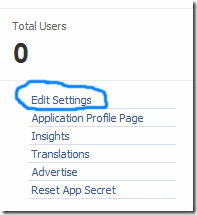
6.  One the new window that appears click the Edit Settings link ,
edit-settings
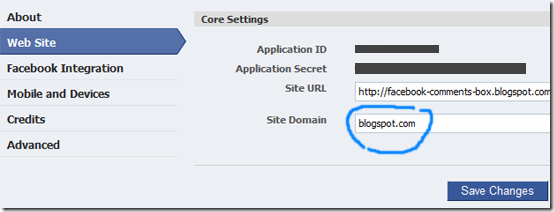
        7.  Then go to Website option and write your Site Domain as blogspot
website
       8.  Save Changes and jump to the next step of this tutorial

2. Adding the codes to your template

We’re adding simples sets of codes into your template to make this work the way we want, aight?

i. xmnls attribute
ii. SDK script
iiI. Open graph meta tag
iv. Comment form iframe code
Log in to your blogger account and click on Template > Edit HTML > Check Expand Widget Template
i. Press Ctrl + F and search for this code: <html
give a space and add below code
 xmlns:fb='http://www.facebook.com/2008/fbml'


5.  Next search for 
 <body>
Note: In New Blogger Designed templates the same code looks like this,
 <body expr:class='&quot;loading&quot; + data:blog.mobileClass'>
 
Find any one of these codes and just after it paste the code given below,
 
<div id='fb-root'/> 
    

<script> 


    window.fbAsyncInit = function() { 


    FB.init({ 


      appId  : &#39;YOUR_APP_ID&#39;, 


      status : true, // check login status 


        cookie : true, // enable cookies to allow the server to access the   session 


      xfbml  : true  // parse XFBML 


    }); 


  };

    (function() { 
    

    var e = document.createElement(&#39;script&#39;); 


      e.src = document.location.protocol +   &#39;//connect.facebook.net/en_US/all.js&#39;; 


    e.async = true; 


      document.getElementById(&#39;fb-root&#39;).appendChild(e); 


    }()); 


</script> 
 
Replace YOUR_APP_ID with your Facebook application ID
     
6.    Next search for  </head> and just above it paste the following code,
 
 <meta expr:content='data:blog.pageTitle' property='og:title'/> 
    

<meta expr:content='data:blog.url' property='og:url'/> 


<meta content='Inspirational Online' property='og:site_name'/> 


<meta content='BLOG-LOGO-IMAGE-LINK' property='og:image'/> 


<meta content='YOUR_APP_ID ' property='fb:app_id'/> 


<meta content='http://www.facebook.com/AdhaPeerFaQeer' property='fb:admins'/> 


<meta content='article' property='og:type'/> 
 
 Make these changes:

  • Replace INspirational Online with your blog title/Name.
  • Replace BLOG-LOGO-IMAGE-LINK with the image link of your logo. Your logo will look good if it is in gif format and having this size ->  40px by 40px . This logo will appear next to your post title on Facebook profiles of your visitors like this,
logo
  • Replace YOUR_APP_ID  with the your Facebook Application ID that you saved in notepad
  • Replace 
    http://www.facebook.com/AdhaPeerFaQeer with your Facebook user profile link 
     
     
     7.    Now Search for this,
    <b:includable id='comment-form' var='post'>
    
    
     8.    Just after it paste the code given below,
     
    <b:if cond='data:blog.pageType == &quot;item&quot;'> 
        
    
    <div style='padding:0px 0px 0px 0px; margin:0px 0px 0px 
    0px;'><script 
    src='http://connect.facebook.net/en_US/all.js#xfbml=1'/> 


    <div> <fb:comments  colorscheme='light' expr:href='data:post.url' expr:title='data:post.title' expr:xid='data:post.id' width='520'/></div> 


    <div style='color:#fff; background-color:#3B5998;border: solid 1px #ddd; font-size:10px; padding:3px; width:510px;'>Facebook
     Blogger Plugin: Bloggerized by <b><a alt='blogger templates' 
    href='http://www.inspirational-online.blogspot.com' style='text-decoration:underline; 
    color:#fff;' target='_blank' title='blogger 
    templates'>Inspirational Online</a></b> Enhanced by 
    <b><a alt='blogger widgets' 
    href='http://www.twitter/abbasizaibi' style='text-decoration:underline;
     color:#fff;' target='_blank' title='Blogger 
    Widgets'>Abbasi Zaibi</a></b></div></div> 
      </b:if>
    
    
    • If you want to use the dark scheme then simply replace light with dark
    • To change the Comments box size, change this value width='520'
    • To change the footer credits size, change this value width:510px
    • Keep a difference of 10 pixels between the box size and footer size. For example if you set box-size to width='600' then set footer-size to width:590px

          9. Save your template and Bingo you are Done! See your blogs to find a beautiful comment box waiting to be touched.:)


Tuesday, 18 December 2012

How to Help Google Webmasters Know if your Site is Hacked?

0

website hacked labelThese days when online earning through blogs and websites is turning into one of the most appealing businesses, there are unavoidable risks of getting your website been hacked. How about malicious content been injected on your website, forcing your readers to never come back to pay a visit? The thought is itself awful, isn’t it? A good news is, Google haslately announced that it has some solutions for those webmasters who are the victim of website hacking.
As I have been saying in my previous posts, Google is smart enough to keep a track of everything, all the time and hence according to the new policies, the site that would be detected as a “hacked website” would be displayed with a warning message “This Site may be compromised”. This has been done to ensure safety of the users who might find the affected site in the search results and find themselves been overloaded with the malicious content.

What makes this news worthy to read is the fact that as a blogger, it is important for you to find whether your blog/website is at risk or not, because in case, it is, then there are wide chances that your website becomes a source to distribute the malicious content among your devoted readers. Moreover, when Google realizes that your site is compromising to facilitate the distribution of malwares, even your site would be having a warning indication in the Google search, affecting your page ranks and your earnings terribly. Therefore, Google has advised all the webmasters to verify their site in Webmaster Tools. Although there are some specific tips for preventing and removing malware from your site, it is still better to be on a safer side to avoid going through a bad phase in business.
A disease can be cured only if you predict it right; however, a dilemma here is that most of the Webmasters do not actually realize when their sites have been infected with the injected malwares. To overcome this, there are two common ways that can help in letting you know that there are malicious third- parties on your website. Let us first see these two ways and then we will talk about how to get your site cleaned from this unwanted mess.

1) Injected Content

As a blogger, you might know by now that what actually these hackers aim for, yes, all they want is to drag your potential traffic to their own sites. One common attempt of doing so is to influence search engines by injecting the links of their sites. This is done way too intelligently where these links are hidden, making their detection difficult by the webmaster. For example, injected malwares appear with your content, making it difficult for the webmaster to identify that he is a victim.
clip_image002

Solution:
Making it easier for you, Google will diagnose all the sites for such injected content, and if your site is one of them, you will receive an e-mail about the notification of this detection. If you would find the content risky, you can then use Fetch as Google tool to check the content of your site.

2) Redirecting Users

There would be hardly anyone who would like to be redirected every time when he visits a site. A good way to hack a site is to redirect its users to malicious sites. This is what the users really hate and might never return to your site in fear of getting redirected again to spammy sites. Again, this can be done in several ways where the hacker might target the viewers who access your site through their mobiles or those who are coming from search engines. It was interesting to find that what actually hackers do. They actually modify the configuration files and serve different users with different contents.
 configuration files
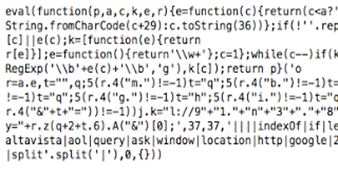
Apart from this, such a hacking can also be done by injecting JavaScript into the source code of your site.
javascripts
Solution:
In order to avoid this, you need to keep a track of your server configuration files for such modifications. For the malicious behavior due to the JavaScript injection, the JavaScript may be designed to hide its purpose, helping terms look like, for example, “eval”, “decode” and “escape”.

Cleanup your Site and Prevent Hacking!

With the two common ways stated above, you can get to know whether your site is compromised or not. If you find your site in risk, then it is necessary to clean it up from the changes that the malwares have brought with them, also preventing your site from getting hacked in future again. You can clean up your site by following the instructions given by Google and prevent such compromises too.
However, you need to consider the sensitivity of the matter and must contact the Google team, informing about your site been compromised. For that you need to submit a reconsideration request after you clean up your site. This is important so that Google can then remove its warning label (indicating you as a compromised site) from its search results.
With that, the post comes to an end, We hope that nothing happens to the sites of our readers, because once affected, it really can bring disastrous outcomes.
Best Wishes,

© 2013 iPRESS. All rights resevered. Designed by Templateism