Showing posts with label Social. Show all posts

Saturday, 22 June 2013

Using Social Networking Websites To Boost Traffic

0
Social Networking website's always play's important factor towards increasing website traffic.Many website giant use it as magic wand which increase's there traffic.But to become successful you have to work hard till you start getting result's.You could use social networking website's as an advertising agent.Tons of user's daily visit social networking website to interact with there friend during the interaction they lead towards your website.Most of Social Networking website's like Facebook,Twitter,Flickr and etc are used commonly to increase popularity of website.The latest addition in social networking website is Google Plus.It is beating almost every social networking website,this is the reason why publisher is now using Google plus instead of Facebook,twitter and etc.Today's Topic is To Drive Traffic From Social Networking Websites

1.Increasing Traffic Through Facebook:
Facebook has great importance on the internet so now days its becoming compulsory for every publisher to build there own Facebook page related to there website niche.But your major work is not done after you create your Facebook page.You must have sufficient likes to build traffic for your website.You can ask your friends,family to like your page but it will not give you desirable results.To increase your Facebook Page like you have to work hard and when your likes are increased just enjoy the true fruits of traffic.Your website must contain a facebook share widget.If you want to spread your content this will boost your traffic a lot

2.Building Twitter Follower's To Build Traffic:
Twitter always remained in Headlines from very start,so you must have a twitter account but more importantly you must have good amount of followers on twitter in order to drive traffic from it.You must insert a tweet Now widget in your website to link your content on twitter this will not only increase your backlinks but also work as a traffic machine.

3.Using Google Plus To Boost Traffic:
Google plus has great importance in social networking website.It's even more important and useful then Facebook.The Google + feature makes it more useful for a publisher.But you must have peoples in your circle to make it working.When ever any one in your Google plus contact will share or Plus 1 any url/content it will automatically ranked well in your Google search if you are logged in your Google plus account.But when you are not logged in your Google Plus one account this will not work and the search results will be totally different

4.The Remaining Important Social Networking Websites:
LinkedIn:Your Website must have LinkedIn Share button to increase traffic
MySpace:Help you to build backlinks and traffic
Flickr:Help you to To build your website community and to build backlinks
From The Editor's Desk:
So i hope you have enjoyed a treat of tips to increase your website traffic via social networking websites.If you spend 2 to 3 hours a week on social networking websites,I am certain it will help you to boost your traffic.More importantly you should not spam,follow all the rules and regulations of social networking websites if you fail to do so you might face detention in form of banning

Tuesday, 4 December 2012

Get back Your Deleted Facebook Page – Submit official help form to Facebook

0
Facebook Pages is the one of the great sources for promoting business and blogging ever for a webmaster. Mostly peoples now use it to promote their business using Facebook ads service, Facebook gives a good rank and popularity on internet business Advisors can target their business page to any country any city using postal codes.
Get back facebook Page Get back Your Deleted Facebook Page   Submit official help form to Facebook
Get back Your deleted facebook Page

Well come to topic here I am going to share with you an awesome tip you can get back your deleted page easily by filling and submitting an official form. There is a lot of Facebook features and forms that you don’t know about them you can get them by searching it on Facebook help center.
In past month Facebook delete millions of pages actually Facebook deleted spam and non-using Facebook pages but in the case a lot of webmasters lost their business fan pages without any reason. Any how our page Inspirational Online also was deleted on Facebook.
You will also love it : How to Appeal to Facebook to unblock or Unban your website / Blog link
How to Get Back Deleted Facebook Page? (Guidance & Filling Form)
Here is three forms that can help you if your Facebook page make trouble with you
Page Disappearing?
Use this form if your page not displaying on Facebook may be if your page disappearing with some peoples, some peoples if couldn’t see your page. You can use this form to give your message to Facebook for fix your Facebook page and make it appear to everyone.
Page Bug?
May your page have bugs? Any bug or any error if it make any trouble with you example one of my page was showing error while posting pictures I wait many days but nothing fixed. But I search onGoogle and I found a link I filled up form and submit it to Facebook within 2 days they fixed my page and I’m making posts happily on Facebook pages.
Here is the most helpful Guidance and form for you if your page deleted may be if your page deleted by wrongly or if it’s disabled coz of some spams you can contact to Facebook using this contact and appeal form. Fill this form with your page details their support will touch you as soon as possible.
May you will get this post helpful I hope you got your stuff anyways if you feel any trouble feel free to leave your comment and make a discussion with us we will help you to solve your problem. And keep visiting our blog.


comments powered by Disqus

Top 10 Facebook Desktop Apps – Manage Your Facebook Account From Desktop

0

Top 10 Facebook Desktop Apps – Manage Your Facebook Account From Desktop

10 Desktop Clients for Facebook – Best Facebook Desktop Tools
I hope you are loving social media apps online and using facebook, twitter, linkedin etc as too much I want to share my experiences with you that can help you too much to expend your work easily. I will share the best collection of desktop clients for facebook. You can manage and share posts direct from your desktop you can chat with all of your friends from your desktop clients.
Facebook top 10 Top 10 Facebook Desktop Apps   Manage Your Facebook Account From Desktop
Top 10 Best Facebook Desktop Apps & Clients
Here is not 1 or 2 tools here are best collection of tools up to 10, I research and collect it all and decided to share that with my lovely blog readers. With desktop facebook apps you don’t have to keep facebook browsing tab opened.
1. Facebook Lite by Pokki
Pokki are the famous app developer and provide desktop App Store with a lot of great apps they has laumches a great desktop facebook app that works on Windows 7, xp, & Windows 8. You can also install their store or get Facebook Lite App direct from here
Top Facebook Desktop Apps Pokki Facebook Top 10 Facebook Desktop Apps   Manage Your Facebook Account From Desktop
Top Facebook Desktop Apps – Pokki Facebook
2. Fliptoast
Simplify Social Networking. The only app to provide a seamless interleaved Facebook and Twitter experience to engage with friends and family.
Fliptoast is free open source application available for all platforms , Windows, Mac, Ipad, Iphone and Android.
Source here:  FlipToast

Top Facebook Desktop Apps – Fliptoast
3. Social Lite & Social Pro
Social Lite & Social pro ara famous desktop apps that are available for many social networks like gmail, for checking mails, twitter tweets & fully manage Facebook with tone of features you can chat online edit and zoom photos.
Top Facebook Desktop Apps SocialDeskApp Top 10 Facebook Desktop Apps   Manage Your Facebook Account From Desktop
Top Facebook Desktop Apps – SocialDeskApp
Source: Social For
4. Facebook Discovery Chat
FacebookDiscovery makes it easy and natural for you to talk with your Facebook friends. Designed with classic instant messaging in mind you will get started with ease.
Top Facebook Desktop Client Facebook discovery Chat Top 10 Facebook Desktop Apps   Manage Your Facebook Account From Desktop
Top Facebook Desktop apps – Facebook discovery Chat
5. Bdule
Bdule Features. It is an free app.  Features:
Search the recent messages posted on Twitter and be the first one informed if anything that matters to you happens.
Get the best Facebook integration to access your profile, home, inbox and friends.
Connect all your Twitter accounts and enjoy the most powerful Twitter client on Windows.
Update your status on multiple services in one go.
Sources: Bdule
Top Facebook Desktop Client bdule Top 10 Facebook Desktop Apps   Manage Your Facebook Account From Desktop
Top Facebook Desktop apps- bdule
Customize your application (language, color scheme, etc).
6. Inbox2
Inbox is a kind of mailing apps once you have installed this you have to authorize your account with Inbox2. You can use twitter , Facebook and other apps and mailing with it. Whenever you get notifications a mail will become to your inbox2 app, and about Newsfeed on right sidebar every newsfeed will shows.
Get Inbox2 Here
Top Facebook Desktop Client Inbox2 Top 10 Facebook Desktop Apps   Manage Your Facebook Account From Desktop
Top Facebook Desktop apps – Inbox2

7. Terlerik Fdeck
Telerik fdeck is a Silverlight-based, client application for Facebook. This product, formerly known as “Microsoft Client for Facebook Beta,” is now available with the name Telerik fdeck and is being offered as a free tool by Telerik. Install Telerik fdeck and enjoy the unforgettable user experience that the application provides.

 Top Facebook Desktop Apps – Telrik Fdeck
8. TweetDeck
Tweetdeck free desktop application for managing facebook, twitter social apps right from your desktop it is installation client for desktop and available for different platforms
Sources : TweetDeck
Top Facebook Desktop Client TweetDeck Top 10 Facebook Desktop Apps   Manage Your Facebook Account From Desktop
Top Facebook Desktop apps – TweetDeck
9. yoono
Yoono is an easy to use application that allows you to connect to all your social networks and instant messaging services – in one place. Get all your friend updates, update your own status, and easily share stuff with your friends.
Top Facebook Desktop Apps – Yoono
10. MultiMi
MultiMi is a free and secure application for keeping in touch with people you care about, through Email or other Social Networks. No matter what service they use, staying in touch is easy and simple with MultiMi. Manage your digital life in one simple application, saving time by leaving multiple logins and switching between browser tabs behind.
Top Facebook Desktop Client MultiMi Top 10 Facebook Desktop Apps   Manage Your Facebook Account From Desktop
Top Facebook Desktop apps – MultiMi


Saturday, 1 December 2012

When will YouTube be Unblocked in Pakistan?

3

When will YouTube be opened in Pakistan? this question has been asked many times from me since the date when YouTube was blocked in Pakistan by PTA. The question is simple and people have right s to ask this question, because they need YouTube for their projects and better purposes. However, the video sharing website won't be unblocked in coming days said, PTA. The last statement from PTA was given on 30th of September, when they told the Pro-Pakistani website and other media reporters that, the website won't be unblocked until removal of Anti-Islamic video. 

However, the website may be unblocked if supreme court orders PTA to do so. Also, the Prime Minister of Pakistan has the ability to order PTA for unblocking YouTube in Pakistan. PTA once again requested Google to remove the Anti-Islamic video from their video sharing website YouTube; but, they denied this again. So surely, the website won't be unblocked in near future.

Will YouTube be unblocked in Pakistan? 

Yes, it might be, but not in this week. As many Muslim countries including Pakistani users have been using other websites for sharing videos and downloading videos. They continuously, spreading a message saying "Don't Use YouTube Any More". Apart from YouTube, Muslims also refuse to Use Google; and  that is a fact because Google's Alexa ranking has dropped dramatically,  Now Google is no longer #1 website. The #1 position has been dominated by Facebook. Google is now #2. So if Google keeps to deny Pakistani request for removal of that movie then it might lose its ranking further more. 

Should YouTube be Opened in Pakistan?

As Google says in their statement that; Google is not a registered company or organization in Pakistan, so they can't follow Pakistani law. But in my opinion, either Pakistani government should request US Government to talk with Google on this issue or Google itself should take down the video from YouTube. And yes, YouTube should be opened in Pakistan as soon as possible, not for watching that video which has sparked the Islamic world, but just for watching better content existing on YouTube.com. 

There are many Pakistani institutions who have video channels on YouTube.com for their students. Especially Virtual University of Pakistan is an online-based education system which's students are suffering from this.


Wednesday, 28 November 2012

How To Add Flash Vortex On Blog

0

How To Add Flash Vortex On Blog

Flash vortex is a webtool provides Online flash banner,vertical menu bars ,other type of buttons that made your blog more stylish. .This flashVortex can easily be added into your blog post or Homepage.
Mainly this flash banners are very useful web tool who loves animation and wouldn't learned animation well..You can create exciting menu bar at less time,No programming skills are needed to create this buttons.

How to implement this on my blog ?


  1.  Go to FlashVortex  and create Flash Banners and Click on 'Generate animation' button at bottom of Page.
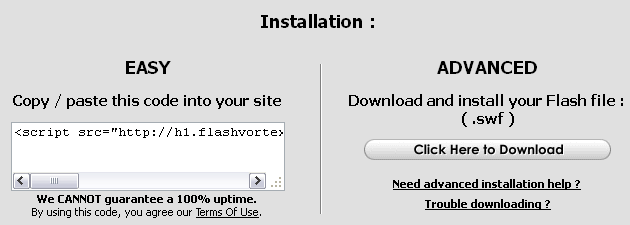
  2. Then you will be displayed like below Image.
  3.  
  4. Now copy down the Code from the Left Box [Easy] And Back to Blogger.com 
  5. If You need to Publish this flash banner in you blog post,then go to Edit this post and Make your blog into HTML mode.
  6. Now Paste down the code and Click on Publish Button.
         If you Need this one in Sidebar ,then Go to Page Elements and Click on 'Add a Gadget ' and select 'HTML/JAVASCRIPT' gadget and Paste the copied code inside it and Save the Gadget. 

    6.  Now Refresh your post.

Here is the some examples of menus,banners,text of Flash vortex

Menus:


Texts:

Banners:


300x250


Friday, 16 November 2012

Remove deactivated Profiles from your Facebook friend list

0
Remove deactivated Profiles from your Facebook friend list
Remove deactivated Facebook profiles
Facebook might be the largest social network in action today, but it isn't without its flaws. A lot of changes made by Facebook seem to cause problems for the users, especially the ones made in 2012. First, the Timeline, then the ticker and the ability of friends to add you to groups without permission. Then there's this problem regarding deactivated and deleted profiles in your friend list. Since the changes made, people started to notice old profiles (and new) that had been deactivated in their friends list. Now this isn't a problem, but it sure clutters up your list and inflates your number of friends. You can easily find and delete these profiles from your list and clear up things.

Detecting deactivated profiles

So how do you know you have these "Ghost Profiles" in your account? Here is a simple test. Go to your profile, and note down the total number of 'friends' you have. This will show you the total number of people in your friend list, including those who have deleted or deactivated their profiles. This is where the problem is, because it should only display the number of active profiles. Hence, Facebook's metrics are flawed, so to speak.

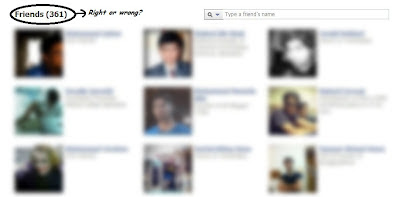
Now, go to https://www.facebook.com/me/friends, and (if possible), count the total number of profiles displayed there (This is where your school arithmetic lessons might come in useful :D). This number will most likely be lesser than the previous one. I, for one, have 361 friends in my list, but upon counting them, I came up with a count of 349, give or take a couple.

Facebook friends

Why does this happen? Suppose you had 100 friends, and Mr. X added you on Facebook. So your total count becomes 101. Sometime later, he decides he's better off without Facebook, so he deactivates his profile. Your count should get back to 100, but it doesn't. It'll be 101, with an added "Ghost Profile".

Removing deactivated profiles

You can easily remove the ghost profiles from your list manually. If you start searching on Facebook with a letter, Facebook will show you your friends that have that letter in their names. For examply, type in 'x' and you will see Mr. X there.

You can recognize the de-activated profiles from the default silhouettes instead of profile pictures. You might also see silhouettes in your friend list. If those silhouettes are active profiles, then you will see a pop-up when hovering over them. Otherwise, they're just deactivated profiles that you can choose to delete. Click on them, and you'll get a message saying that the profile has been deactivated. There's an option to un-friend that profile. Go ahead if you want.

Active profiles


Email Subscription + Social Share Widget For WordPress & Blogger

0

Email Subscription + Social Share Widget For WordPress & Blogger

This is Grat Widget for Blogs, This is Simple Code that you can add Simply in WordPress or Blogger no Need any plugin etc.
its Simple Code you should just change your Social usernames etc.
Features :
  • No Need any Plugin
  • Simple Code
  • Simply can add into widget area.
  • Get more Traffic from Socials
  • Easy to Increase Subscriptions
  • Easy to Customize
  • Much more….

How to Add Widget?

  • Simply login into your Dashboard
  • Go to Widget Area
  • Click on add new Widget
  • Choose Tex/html
  • And Copy the Code frome Below and paste there
  • And save changes and see the blog
[toggle title_open="Click Here to see the Code" title_closed="Click Here to see the Code" hide="yes" border="yes" style="default" excerpt_length="0" read_more_text="Read More" read_less_text="Read Less" include_excerpt_html="no"]
<style>
.mbtbar{width: 100%; float: left;}
.mbtbar .count{color:#333; font-size: 14px; font-weight: bold; font-family: Helvetica, Arial; background: #fff; height: 45px; line-height: 45px; vertical-align: middle; width: 100%; padding: 0 10px 0 4px;}
.mbtbar .count span.bigcount{color:#F17C18; font-size: 24px; font-family: Helvetica, Arial; line-height: 39px; vertical-align: top; padding-right:3px;}
.mbtbar .subicons{border-bottom: 1px solid #e6e6e6; margin: 0px 0 0px 0; float: left; width: 300px; font-family: Helvetica, Arial; font-size: 14px;}
.mbtbar .subicons a{text-decoration: none; color:#333333;}
.mbtbar .subicons a:hover{text-decoration: underline; color:#333333;}
.mbtbar .subicons .rssicon{border-right: 1px solid #e6e6e6; background: url(https://blogger.googleusercontent.com/img/b/R29vZ2xl/AVvXsEjbBzL4JWzB1d9Q0D8LqTsjzxzMtDWw7u2WHhjxBOcAKcf-6lY7Ht4tpm5yTvkRt8gd0q-AOgx6Xh3h0sjcz76HECc6bXqFv2gMS49eVjQNgnIkForlQVovwQHWeB2focHiQUQhRGJx75c/s400/rss.png) no-repeat left center; min-width: 20px; height: 48px; line-height: 57px; vertical-align: middle; float: left; padding: 0px 20px 0px 30px; margin: 0 0 0 5px;}
.mbtbar .subicons .fbicon{border-right: 1px solid #e6e6e6; background: url(https://blogger.googleusercontent.com/img/b/R29vZ2xl/AVvXsEj65fEU4ywbAzhj0beNKjS2iDVl4wLr2e9pR6qD4oDGDd_QMo_Mdq-Vyq3VmCWM_6gdPrtBh0YnZgvQysMbQW4wL7SxGXOcDXxUX_kA2zrhNviQ7l9Tmx7jcESSJzkVdNA0ztTNP-EOwK4/s400/facebook.png) no-repeat left center; min-width: 20px; height: 48px; line-height: 57px; vertical-align: middle; float: left; padding: 0px 20px 0px 30px; margin: 0 0 0 5px;}
.mbtbar .subicons .twittericon{background: url(https://blogger.googleusercontent.com/img/b/R29vZ2xl/AVvXsEjbp8wRoN0sVln3_R_PA4dPtokRHMKaPqWYrtmlKdUoywKrtAR1wW-aOCM-_SZXJwdHDaXj6GlfpxNg1RikYMgZKnYGLhlGgp5_KkIQ0anW0sBB57Yav1SqqXt7n37O6_U4UURGLYADOpE/s400/twitter.png) no-repeat left center; min-width: 20px; height: 48px; line-height: 57px; vertical-align: middle; float: left; padding: 0px 20px 0px 30px; margin: 0 0 0 5px;}
.mbtbar .emailsub{border-bottom: 1px solid #e6e6e6; padding: 15px 0 20px 0; float: left; width: 100%; font-family: Helvetica, Arial;}
.mbtbar .emailsub .emailicon{background: url(https://blogger.googleusercontent.com/img/b/R29vZ2xl/AVvXsEhDjrYXsTywSbiKH9AtIc6HS0am8IM2447pvq0dggxV-Dc6pW5atMY_Ef66rhhBXl34O7Q0IJ4pE2QqUx39h21Bslqq8r3zueEjDFWP_w982tsOAsndGVLAwNCDxkYaKiNaOShkp6ZjtWc/s400/email.png) no-repeat left center; float: left; padding: 5px 15px 0px 35px; margin: 0 0 0 5px; width: 300px; height: 28px; line-height: 28px; vertical-align: middle; font-size: 14px; color: #333; }
.mbtbar .emailsub .emailupdatesform{margin: 15px 0 5px 5px; width: 300px; float: left;}
.mbtbar .emailsub .emailupdatesform input.emailupdatesinput{background: #fff !important; float: left; border: 1px solid #d2d2d2; padding: 0px 8px 0px 8px; color: #a19999; font-size: 12px; height: 25px; width: 200px; -moz-border-radius: 5px; -webkit-border-radius: 5px;}
.mbtbar .emailsub .emailupdatesform input.joinemailupdates{background:-moz-linear-gradient(top,#57ABFE 0%,#0080ff 100%); background:-webkit-gradient(linear,left top,left bottom,from(#57ABFE),to(#0080ff)); border: 1px solid#0080ff; text-transform: uppercase; color: #fff; height: 25px; padding: 0 12px 0 12px; margin: 0 0 0 5px; -moz-border-radius: 5px; -webkit-border-radius: 5px;}
</style>
<!–[if IE 7]>
<style>
.mbtbar .count span.bigcount{color:#F17C18; font-size: 24px; font-family: Helvetica, Arial; line-height: 34px; vertical-align: middle; }
.mbtbar .emailsub .emailupdatesform input.joinemailupdates{background:#0080ff; border: 1px solid #0080ff; text-transform: uppercase; color: #ffffff; font-weight:bold; height: 25px; padding: 0 12px 0 12px; margin: 0 0 0 5px; }
</style>
<![endif]–>
<div><div>Join <span>1675+</span> People Following Inspirational Online</div><div><div><a href=”http://www.mybloggertricks.com/feeds/posts/default” target=”_blank”>RSS</a></div><div><a href=”https://www.facebook.com/InspirationalOnline” target=”_blank” rel=”nofollow”>Facebook</a></div><div><a href=”http://twitter.com/abbasizaibi” target=”_blank” rel=”nofollow”>Twitter</a></div></div>
<div>
<div>Stay Updated via Email Newsletter</div>
<div>
<form action=”http://feedburner.google.com/fb/a/mailverify” method=”post” target=”popupwindow” onsubmit=”window.open(‘http://feedburner.google.com/fb/a/mailverify?uri=tntbystc‘, ‘popupwindow’, ‘scrollbars=yes,width=550,height=520′);return true”><input gtbfieldid=”10″ name=”email” value=”Enter your email…” onblur=”if (this.value == &#39;&#39;) {this.value = &#39;Enter your email…&#39;;}” onfocus=”if (this.value == &#39;Enter your email…&#39;) {this.value = &#39;&#39;;}” type=”text” /><input value=”tntbystc” name=”uri” type=”hidden” /><input value=”Join” type=”submit” /></form></div></div></div>
[/toggle]

Wibya : Free Social footer Toolbar for your site

0

Wibya : Free Social footer Toolbar for your site

Here is Social great Widget for your blog and site
its will help you to stay connect your visitors with your site
1 click facebook like tweets, rss,
Online chats and much more
wibya Wibya : Free Social footer Toolbar for your site
Features
  • All colours
  • Easy to upgrade
  • Edit anytime you want
  • simple code interegate
  • Social tools all Youtube, facebook, yahoo, twitter
  • Online chat for all
  • Web based social media sharing toolbar for bloggers.
  • Easy to integrate. No coding required.
  • Add services like Twitter, Facebook, Youtube and let readers share content.
  • Application bank lists apps that can be added to the toolbar.
  • Much More
  • Get It Now Here

How-to Post to Multiple Social Networks When You Are Offline, Schedule It With Buffer

0

How-to Post to Multiple Social Networks When You Are Offline, Schedule It With Buffer

Facebook, Twitter, LinkedIn, Foursquare, Reedit, etc. are biggest social networks there is also many more but here are these some of social networks, peoples stay connect with each other with these networks,
As well I will tell you how you can post you 1 status link etc. to multiple social networks from one place, even you can schedule all them any time, and you can post status when you are offline.
Here is the App with the name Buffer App may be you heard are used it ever it is famous app on internet. Buffer is a web service for scheduling tweets, LinkedIn profile and group posts, as well as Facebook updates for both profiles and pages. Buffer is great if you want to plan ahead and schedule your updates in advance.
buffer app How to Post to Multiple Social Networks When You Are Offline, Schedule It With Buffer
How to set it up
Open Buffer App There Press Connect Account Button and authorize facebook & Twitter accounts Once you authorized you will be able make buffer Posts
Write Your Posts and select account. Click on Post or Add to Buffer.
How to Add Buffer Button to Every Post with Buffer for Chrome.
You Can Fine Buffer App for Firefox & Chrome and many Extra Apps Here
uffer For chrome Here
Buffer in Chrome How to Post to Multiple Social Networks When You Are Offline, Schedule It With Buffer
When you Witll Install Addon for chrome or Firefox A Buffer button will appear in every posts.
This is button on Facebook fan page while writing status.

This is Button on Twitter while tweeting.

You Can Configure your Buffer App for Chrome or Firefox from configuration settings.
Post and Schedule to Multiple Social Networks with Buffer 2 How to Post to Multiple Social Networks When You Are Offline, Schedule It With Buffer

I hope You may like it feel free to leave comment if trouble, we love to have comment and keep visiting my blog.


comments powered by Disqus

© 2013 iPRESS. All rights resevered. Designed by Templateism