Showing posts with label Seo Tips. Show all posts

Saturday, 7 September 2013

How to Convert Blog content to many forms

1


In this tutorial you will learn that how can you convert your blog content to many forms.
it will help you a lot to engage  your visitors forver with your website or blog


Saturday, 11 May 2013

New Facebook Comment Box for Blogger With Notifications Enabled

15
Facebook comment box for your blog can serve as a good way to make your site more engaging and encourage readers to drop comments if they’re already logged in to Facebook.It will bring more trafic to you blog or website for example when i'll comment on any website through facebook comment box that page will automatically share on my wall but it has a disadvantage it has no SEO value since it's displayed in iframe which google dont like.The main advantage of  Facebook comment box is that it lack lot of traffic to your website

In 2009 facebook developers introduced thier best and famous plugin called "Facebook Comments Box".
Facebook Comments Box can be  embedded in any website and blog and visitors can use thier facebook ID's to leave comment,they can also use Yahoo, AOL or Hotmail to leave comment.
This is how the Facebook Comments box looks like,
                                                                    LIGHT SCHEME
DARK SCHEME

How to add Facebook comment box to Blogspot

There are some steps to get this done but chill out, it’s easy, ok? :D Just follow the steps and you’ll have a nice Facebook comment box installed on your blog in no time.

1. Creating a Facebook Application


  1. Go To Facebook Developers Page
  2. Submit your blog URL and give it a name. Keep Site name as your "Blog Title" and Site URL as your "blog address" 


     3.   Hit "create app" button and proceed
     4.   After submitting the security check code you will see this page,


       5.   Save that App ID in a notepad because we will need that latter. Now Click the link near the top-right corner of the same page that says "Developer Dashboard"


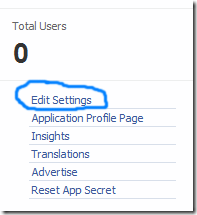
6.  One the new window that appears click the Edit Settings link ,
edit-settings
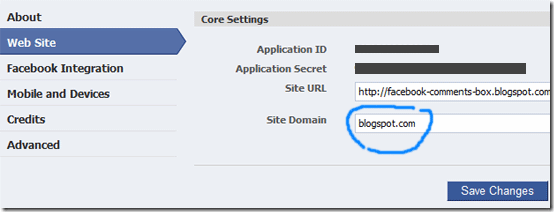
        7.  Then go to Website option and write your Site Domain as blogspot
website
       8.  Save Changes and jump to the next step of this tutorial

2. Adding the codes to your template

We’re adding simples sets of codes into your template to make this work the way we want, aight?

i. xmnls attribute
ii. SDK script
iiI. Open graph meta tag
iv. Comment form iframe code
Log in to your blogger account and click on Template > Edit HTML > Check Expand Widget Template
i. Press Ctrl + F and search for this code: <html
give a space and add below code
 xmlns:fb='http://www.facebook.com/2008/fbml'


5.  Next search for 
 <body>
Note: In New Blogger Designed templates the same code looks like this,
 <body expr:class='&quot;loading&quot; + data:blog.mobileClass'>
 
Find any one of these codes and just after it paste the code given below,
 
<div id='fb-root'/> 
    

<script> 


    window.fbAsyncInit = function() { 


    FB.init({ 


      appId  : &#39;YOUR_APP_ID&#39;, 


      status : true, // check login status 


        cookie : true, // enable cookies to allow the server to access the   session 


      xfbml  : true  // parse XFBML 


    }); 


  };

    (function() { 
    

    var e = document.createElement(&#39;script&#39;); 


      e.src = document.location.protocol +   &#39;//connect.facebook.net/en_US/all.js&#39;; 


    e.async = true; 


      document.getElementById(&#39;fb-root&#39;).appendChild(e); 


    }()); 


</script> 
 
Replace YOUR_APP_ID with your Facebook application ID
     
6.    Next search for  </head> and just above it paste the following code,
 
 <meta expr:content='data:blog.pageTitle' property='og:title'/> 
    

<meta expr:content='data:blog.url' property='og:url'/> 


<meta content='Inspirational Online' property='og:site_name'/> 


<meta content='BLOG-LOGO-IMAGE-LINK' property='og:image'/> 


<meta content='YOUR_APP_ID ' property='fb:app_id'/> 


<meta content='http://www.facebook.com/AdhaPeerFaQeer' property='fb:admins'/> 


<meta content='article' property='og:type'/> 
 
 Make these changes:

  • Replace INspirational Online with your blog title/Name.
  • Replace BLOG-LOGO-IMAGE-LINK with the image link of your logo. Your logo will look good if it is in gif format and having this size ->  40px by 40px . This logo will appear next to your post title on Facebook profiles of your visitors like this,
logo
  • Replace YOUR_APP_ID  with the your Facebook Application ID that you saved in notepad
  • Replace 
    http://www.facebook.com/AdhaPeerFaQeer with your Facebook user profile link 
     
     
     7.    Now Search for this,
    <b:includable id='comment-form' var='post'>
    
    
     8.    Just after it paste the code given below,
     
    <b:if cond='data:blog.pageType == &quot;item&quot;'> 
        
    
    <div style='padding:0px 0px 0px 0px; margin:0px 0px 0px 
    0px;'><script 
    src='http://connect.facebook.net/en_US/all.js#xfbml=1'/> 


    <div> <fb:comments  colorscheme='light' expr:href='data:post.url' expr:title='data:post.title' expr:xid='data:post.id' width='520'/></div> 


    <div style='color:#fff; background-color:#3B5998;border: solid 1px #ddd; font-size:10px; padding:3px; width:510px;'>Facebook
     Blogger Plugin: Bloggerized by <b><a alt='blogger templates' 
    href='http://www.inspirational-online.blogspot.com' style='text-decoration:underline; 
    color:#fff;' target='_blank' title='blogger 
    templates'>Inspirational Online</a></b> Enhanced by 
    <b><a alt='blogger widgets' 
    href='http://www.twitter/abbasizaibi' style='text-decoration:underline;
     color:#fff;' target='_blank' title='Blogger 
    Widgets'>Abbasi Zaibi</a></b></div></div> 
      </b:if>
    
    
    • If you want to use the dark scheme then simply replace light with dark
    • To change the Comments box size, change this value width='520'
    • To change the footer credits size, change this value width:510px
    • Keep a difference of 10 pixels between the box size and footer size. For example if you set box-size to width='600' then set footer-size to width:590px

          9. Save your template and Bingo you are Done! See your blogs to find a beautiful comment box waiting to be touched.:)


© 2013 iPRESS. All rights resevered. Designed by Templateism